
The List Loop Start and the "List Loop End" operators are used to create a closed action sequence that iterates over the items of a Parameter List. The List Loop Start operator starts the loop and sets the current list item as a variable parameter, while the List Loop End operator ends the loop and triggers the next iteration. This allows for repeated execution of a sequence of actions for each item in the specified Parameter List.
Operator ports
Input action: Specific sample type, see below.Output action: Action sequence blobs
Output counter: Floating point values
This output has a non-uniform, or irregularly timed signal, which means that samples are not equidistant. A non-uniform signal has special requirements and not all operators can be used for this kind of signal.
For the rest, non-uniform signals work just like normal signals.
Each time the List Loop Start operator receives an Action, it will take the next value from the specified parameter list and set that value in the variable parameter ListItem and then execute the connected action sequence. If that sequence of actions hits the List Loop End operator, the next item in the parameter list will be set in ListItem and the actions are ran again. This continues until the last item in the parameter list has been handled. After that, the action sequence after the List Loop End will continue.
During the iteration, a counter at the second output of the List Loop Start will increase from 0 to the number of items in the list. If required, you may use those counting values, otherwise just connect the counter output to the counter input of the List Loop End operator.
A sequence of Action operators that are connected to the "action" output of the List Loop Start operator, must end with a connection to the "action" input of the List Loop End operator. Also the "counter" ports of both operators must be connected.
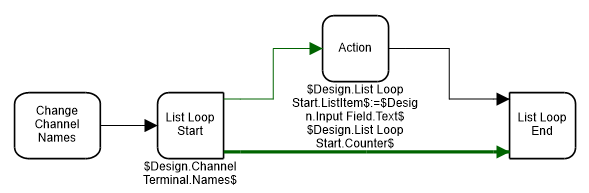
Nested loops are allowed, but the inner loop must be fully contained within the outer loop.
If the specified parameter list supports writing of the list items, then you can write new values in the ListItem variable. The value is then copied back into the item of the parameter list that is currently handled.
Properties
Find more information about changing properties here: "Properties Viewer"Address
type: Address, enclosed in '$' characters (see "Address - how to address objects and variable parameters")Specify the address of a parameter list.
See ""Parameter List"" to get more information about what a parameter list means.
Caption
type: Word or phraseThe name of the object in the project. This name must not contain '.', '$' nor '@' characters.
Documentation
type: See descriptionOptional documentation of this object. If this object is an operator, the Documentation text is displayed below the operator symbol.
Variable Parameters
Find more information about Variable Parameters here: "Variable Parameters"ListItem
type: See descriptionRepresents the current item of the specified parameter list during the loop iteration. You can also write to this variable.
Counter
type: See descriptionCounter value that refers to the index of the current item in the parameter list during the loop iteration.
Examples
Example: List Loop Demo 1
Demonstrates how the channel name list of the Channel Terminal operator is read and how each name is changed to a text written in an Input Field plus a number.Also shows how items in the list are read and written by using the ListItem variable of the List Loop Start operator.
Examples\DF2011001_001_List_Loop_Channel_Names.xmc